How to Safely Check Your Visa Application Status Online: Easy Steps
Waiting to hear back about your visa application can be nerve-wracking. You want to know where your application stands without risking your personal information or falling for scams.
That’s why knowing how to safely check your visa application status online is so important. You’ll discover simple, secure steps to track your application with confidence. Keep reading to learn how to protect yourself and get the answers you need—fast and worry-free.

Credit: chicago.china-consulate.gov.cn
Prepare Your Documents
Preparing your documents is the first step to checking your visa application status online safely. Having all necessary details ready makes the process smooth and quick. It helps avoid mistakes and saves time.
Gather Your Application Details
Collect all information related to your visa application. This includes your full name, date of birth, and passport number. Keep your application form handy. These details verify your identity on the official website.
Check your email for any confirmation messages from the visa office. These often contain key information. Keep a copy of your application receipt or acknowledgment letter. It will be needed to track your status.
Locate Your Receipt Number
The receipt number is a unique code given after you submit your visa application. It is essential to check your status online. You can find it on the receipt or confirmation email from the visa office.
Look for a combination of letters and numbers, usually starting with three letters. Write it down or save it on your device. Without this number, tracking your application is impossible.
Visit Official Visa Websites
Visiting the official visa websites is the safest way to check your visa application status online. These websites provide accurate and up-to-date information. Using them helps protect your personal data from scams.
Official portals often have clear instructions and secure login options. They are managed by government agencies responsible for visa processing. Always start your search from these trusted sources.
Identify The Correct Government Portal
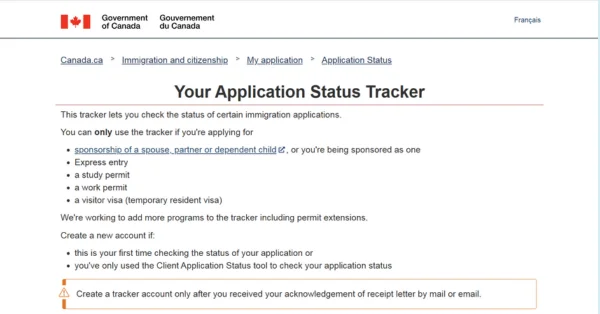
Find the website managed by the government of the country you applied to. Look for URLs ending with “.gov” or the country’s official domain. These sites often display official seals or logos.
Check the site’s language and contact details. They should match the country’s official information. Avoid third-party sites that do not link back to the official government page.
Avoiding Fraudulent Sites
Beware of websites that ask for extra fees beyond the official charges. Fake sites may request unnecessary personal information. Look for secure connection signs like “https” in the URL.
Never click on suspicious links from emails or messages. Confirm the website address by typing it directly into your browser. Using only official portals keeps your visa status safe and private.
Create Or Log Into Your Account
Creating or logging into your account is the first step to check your visa application status online. This account keeps your information safe and allows you to track updates. It is important to follow safe practices to protect your personal details.
Registering Safely
Start by visiting the official visa application website. Avoid third-party sites that may not be secure. Enter your details carefully and double-check for errors. Use your real information to avoid delays. Look for a secure connection; the web address should start with “https”.
Using Secure Passwords
Create a strong password for your account. Use a mix of letters, numbers, and symbols. Avoid easy words like “password” or your birthdate. Change your password regularly to keep your account safe. Never share your login details with others.
Enter Your Application Information
Entering your application information correctly is the first step to check your visa status online. The website asks for specific details to find your application. These details must match exactly what you submitted in your visa form. This step helps protect your personal information and speeds up the process.
Inputting Accurate Details
Type your application number carefully. This number is usually on your receipt or confirmation email. Use the exact format shown there, including any letters or dashes. Enter your date of birth as requested, often in the format of month/day/year. Make sure to use the same name spelling as on your application. Small mistakes can cause the system to not find your record.
Double-check For Errors
Review every detail before submitting. Check each number and letter for typos. Confirm your birth date matches your official documents. Look for extra spaces or missing characters. Taking a moment to verify this information avoids delays. Correct details help you get your visa status quickly and safely.
Interpreting Your Visa Status
Understanding your visa application status can feel confusing. Each status message tells you something important about your application. Knowing what these messages mean helps you stay informed and prepared. This section explains common status messages and what to do next based on your status.
Common Status Messages
Many visa applications show similar status messages. “Application Received” means your documents arrived safely. “In Process” shows that your application is under review. “Additional Documents Required” means the embassy needs more information. “Interview Scheduled” tells you when and where to go. “Approved” means your visa is ready. “Denied” means your application was not successful.
Next Steps Based On Status
Each status requires a different action. If your status is “Additional Documents Required,” prepare and send the needed papers quickly. For “Interview Scheduled,” attend the meeting on time and bring all documents. If your visa is “Approved,” follow instructions to collect it. For “Denied,” understand the reason and check if you can appeal or reapply. Staying aware helps avoid delays and problems.

Credit: www.wikihow.com
Protecting Your Personal Information
Checking your visa application status online requires sharing sensitive details. Protecting your personal information is important. This helps keep your data safe from theft or misuse. Taking simple safety steps can make a big difference. Stay cautious and guard your information well.
Using Secure Connections
Always use a secure internet connection to check your visa status. Look for “https://” at the start of the website address. It means the site encrypts your data. Avoid sites without this security feature. Encryption stops hackers from stealing your information.
Secure connections protect your password and personal details. Use trusted devices to avoid hidden malware. Keep your browser and security software updated. These updates fix security weaknesses and keep your data safe.
Avoiding Public Wi-fi
Public Wi-Fi is risky for checking visa applications. These networks often lack strong security. Hackers can easily intercept your data there. Avoid using airport, cafe, or hotel Wi-Fi for sensitive tasks.
Use your phone’s mobile data or a private network instead. If public Wi-Fi is your only option, use a Virtual Private Network (VPN). A VPN adds a layer of protection and hides your activity. This reduces the chance of data theft.
Troubleshooting Common Issues
Checking your visa application status online can be quick and easy. Sometimes, problems may arise during the process. Troubleshooting common issues helps you stay on track and avoid delays. This section covers simple steps to fix website errors and contact support if needed.
Handling Website Errors
Website errors can stop you from accessing your visa status. Clear your browser cache and cookies first. Try using a different browser or device. Ensure your internet connection is stable. Check if the website is under maintenance. Wait a few minutes and try again. These steps often fix simple issues fast.
Contacting Support
Support teams help when problems persist. Locate the official contact details on the visa website. Use email or phone to explain your issue clearly. Provide your application number and personal details. Keep your questions short and direct. Wait patiently for a reply; response times vary. Support can guide you through complex problems safely.
Credit: thaonco.com
Frequently Asked Questions
How Do I Safely Check My Visa Application Status Online?
To safely check your visa status online, use the official government website only. Avoid third-party sites to protect your personal data. Log in with your application ID and date of birth for secure access. Always ensure the website URL begins with “https://.
“
What Information Is Needed To Track Visa Status Online?
You typically need your application reference number or receipt number. Additionally, your passport number and date of birth may be required. Keep this information handy before logging into the official visa portal. This helps ensure accurate and quick status updates.
How Often Should I Check My Visa Application Status?
Check your visa status once every one to two weeks. Frequent checks won’t speed up processing but will keep you updated. Avoid daily checks to prevent unnecessary stress. Stay patient and monitor only as recommended by the visa office.
Can I Receive Email Updates About My Visa Status?
Yes, many visa offices offer email notifications for status changes. You can sign up on the official portal during or after your application submission. Email alerts provide timely updates without needing to log in regularly. Always confirm the authenticity of the sender.
Conclusion
Checking your visa application status online keeps you informed and reduces stress. Use official websites to avoid scams and protect your information. Keep your application number handy for quick access. Regularly checking helps you stay updated on any changes. Stay patient and follow the steps carefully for a smooth process.
Your careful attention makes a big difference in your visa journey.